“You can’t fix what you can’t measure — and that’s exactly what Data Quality Reports solve.”
The Reality of Enterprise Data
Every organization depends on data for decisions, compliance, and performance tracking — yet most raw data is not ready for reliable use. Missing values, format inconsistencies, and data quality-related errors quietly distort insights.
NucliOS Data Quality Reports (DQR) bridges this gap by acting as a measurement framework for data quality. Through rule-based and AI-driven validations, DQR highlights where data breaks, why it matters, and which datasets are affected, helping teams assess readiness and prioritize remediation before acting on it.
Why Data Quality Reports Matter?
Every organization depends on data, but few can quantify how good their data truly is. From missing entries and inconsistent formats to inaccurate records spread across systems, these hidden issues silently erode confidence in analytics and other critical business reporting use cases.
That is where NucliOS Data Quality Reports (DQR) come in. A framework that can measure the quality of data through intelligent rule generation, transparent reporting, and reusable validation logic.
What Are NucliOS Data Quality Reports?
NucliOS Data Quality Reports (DQR) provide a structured, intelligent way to profile, validate, and measure data quality.
They connect to diverse data sources, generate context-aware validation rules, and present findings through interactive reports that make quality gaps clear and actionable. By highlighting where quality drops and guiding users toward the most impactful fixes, DQR turns data visibility into accountability — helping teams act with confidence on the data they use every day.
The Intelligence Layer: AI-Driven Rule Generation
At the heart of DQR lies its Intelligence Layer, responsible for understanding context and translating it into structured quality rules. It operates in three key phases:
1. Rule-Based Generation
This is where the foundation is built. Users start by applying structured, rule-based templates — predefined checks that validate datasets against expected formats, values, and completeness. This establishes a baseline of quality with clear, auditable rules.
2. Context-Aware Generation (Using AI)
Once context (like schema, metadata, and business logic) is onboarded, the DQR AI Agent steps in. It generates rules automatically by interpreting relationships, hierarchies, and data flow across connected tables. This ensures that validation is not isolated; it is contextually aware and purpose-driven.
3. Expand via Natural Language Interaction
Even after AI rules generation, there may be additional rules or nuanced business conditions that need to be captured. That is where conversational rule generation comes in. Users can describe requirements in plain natural language — the agent interprets, generates a candidate rule, displays it for review along with the description, and refines it through feedback. Once approved, the rule is added to the Rule Repository — a growing library of reusable, validated logic tied to your data sources.
The result is a living repository of quality intelligence — continuously learning, contextual, and organization-specific.
From Rules to Incidents: The Execution Layer
Once rules are in the repository, they do not automatically execute. Teams can choose which rules to apply to a specific validation run, creating what DQR calls an Incident — a defined execution set for a given data source. Just because a rule exists does not mean it is relevant for every use case. Incidents help users’ subset and focus — selecting the most meaningful checks for the scenario at hand.
These incidents can be initiated directly within the NucliOS platform through Run DQ Report or exported as Software Development Kit (SDK) for seamless execution from an external Data Engineering Pipeline.
The DQR Workflow (Walkthrough)
Create New Data Quality Report Flow
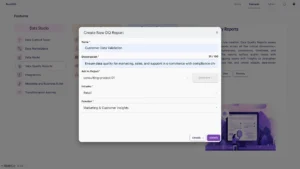
Start by defining the project, industry, and function to give your flow context. Once set up, proceed to connect data sources — the foundation for your validation process.
Connect to Datasets
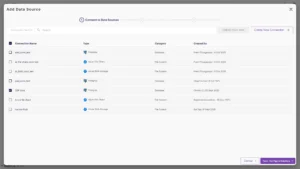
Bring in structured data from databases like PostgreSQL or from file or cloud-based systems. This unified onboarding ensures all relevant sources are captured under one quality framework.
Configure Datasets
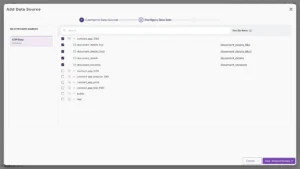
Select and configure datasets to include in the flow. Keeping the scope tight ensures faster runtime and sharper results during rule execution.
Onboard Context
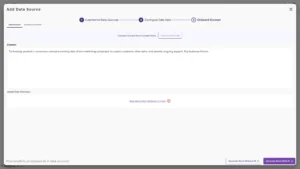
With datasets ready, onboard the business context by uploading a data dictionary and defining key drivers or any other business context. This step helps the AI Agent understand intent — generating rules that are context-aware, not generic.
Generate Rules with AI
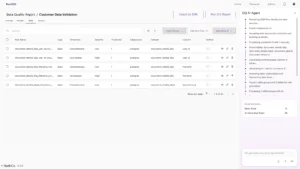
Here is where intelligence meets structure. Users can create rules using both basic rule-based templates and AI-assisted generation.
The AI Agent analyzes schema, metadata, and relationships to propose relevant rules.
Add rule using AI
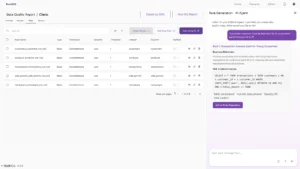
Users can also add rules manually or describe them in natural language, by clicking on add using AI which the system translates into executable logic. All accepted rules are stored in the Rule Repository
Run Data Quality Report
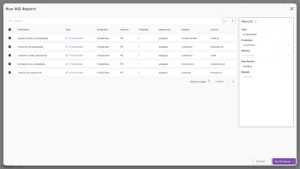
From the rule repository, select the subset of rules relevant to your use case — creating an Incident for execution. The system runs these checks to surface incident-level insights, pinpointing where data fails policies or expectations.
View Reports
Analyze outcomes through interactive dashboards that highlight:
Incident-Level Reports — overall DQ score, failed rules, and historical comparisons.
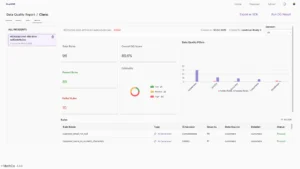
Export as Software Development Kit (SDK)
You can export any Data Quality Report as an SDK, transforming the current flow’s rules, thresholds, and dataset mappings into a portable, reusable framework. This SDK can then be installed in other environments, where users simply provide their data source credentials and run the same quality checks seamlessly within existing pipelines — be it Airflow, dbt, or CI/CD systems. By enabling teams to replicate validations, monitor results, and maintain consistency across projects, the SDK ensures that data quality reporting becomes a standardized, scalable, and auditable process across the enterprise.
Turning Reports into Intelligence
Each DQR output quantifies trustworthiness:
· DQ Score: Composite index of overall data health
· Breakdown: Accuracy, completeness, timeliness, reliability, and consistency
· Trend: Regression or improvement across runs
· Actionability: Issues marked for follow-up.
The focus is on transparency and clarity — clearly identifying data quality issues and presenting them through measurable, actionable insights.
How DQR Differs from Traditional DQR
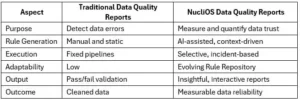
Conclusion: From Data Guesswork to Data Assurance
Data Quality Reports turn the abstract concept of “data quality” into something tangible.
They let teams see, score, and understand their data before acting on it.
With AI-driven intelligence, structured rule repositories, and flexible execution modes, NucliOS DQR helps organizations move from data uncertainty to data confidence.