Power BI’s recent advancements in collaborative analytics are a strategic necessity for organizations adopting DevOps principles in their Business Intelligence (BI) workflows. The ability to co-develop and edit reports in real-time fundamentally transforms the delivery lifecycle, translating into accelerated decision-making, enhanced data governance, and the creation of reliable Continuous Integration/Continuous Delivery (CI/CD) pipelines for analytics.
Historically, the “one editor at a time” model created a severe workflow bottleneck, preventing parallel development, automated testing, and rapid deployment. The 2025 updates to Power BI solve this inefficiency by introducing simultaneous editing in a single, secure cloud workspace, providing the necessary source control foundation to align BI development with modern IT standards.
The Technical Backbone: Enabling CI/CD Readiness
Power BI now enables multiple contributors—from analysts to data engineers—to work concurrently on the same report, dashboard, or underlying semantic dataset. Changes are instantly synchronized, ensuring all authorized collaborators access the exact, freshest state of the report.
Features Driving Governance and Auditability
Robust mechanisms are prerequisites for a successful DevOps process:
- Audit Trail and Version Control: Power BI maintains a comprehensive Commit History, automatically saving immutable versions. Editors can safely review, compare, or revert to earlier iterations, providing end-to-end audit trails and structured change management required for compliance.
- In-Context Workflow: Embedded discussion threads and comment functionality move review and approval discussions directly into the development environment, streamlining the BI equivalent of a “pull request.”
- Granular Security: Workspace roles (admin, member, contributor, viewer) are strictly enforced, safeguarding the stability of the production environment by separating privileges for technical experts and content consumers.
Business Impact through DevOps Enablement
Allowing multiple experts to edit content concurrently delivers the essential speed and control required for a modern data pipeline, directly strengthening the Return on Analytics Investment (ROI) and reducing operational risk.
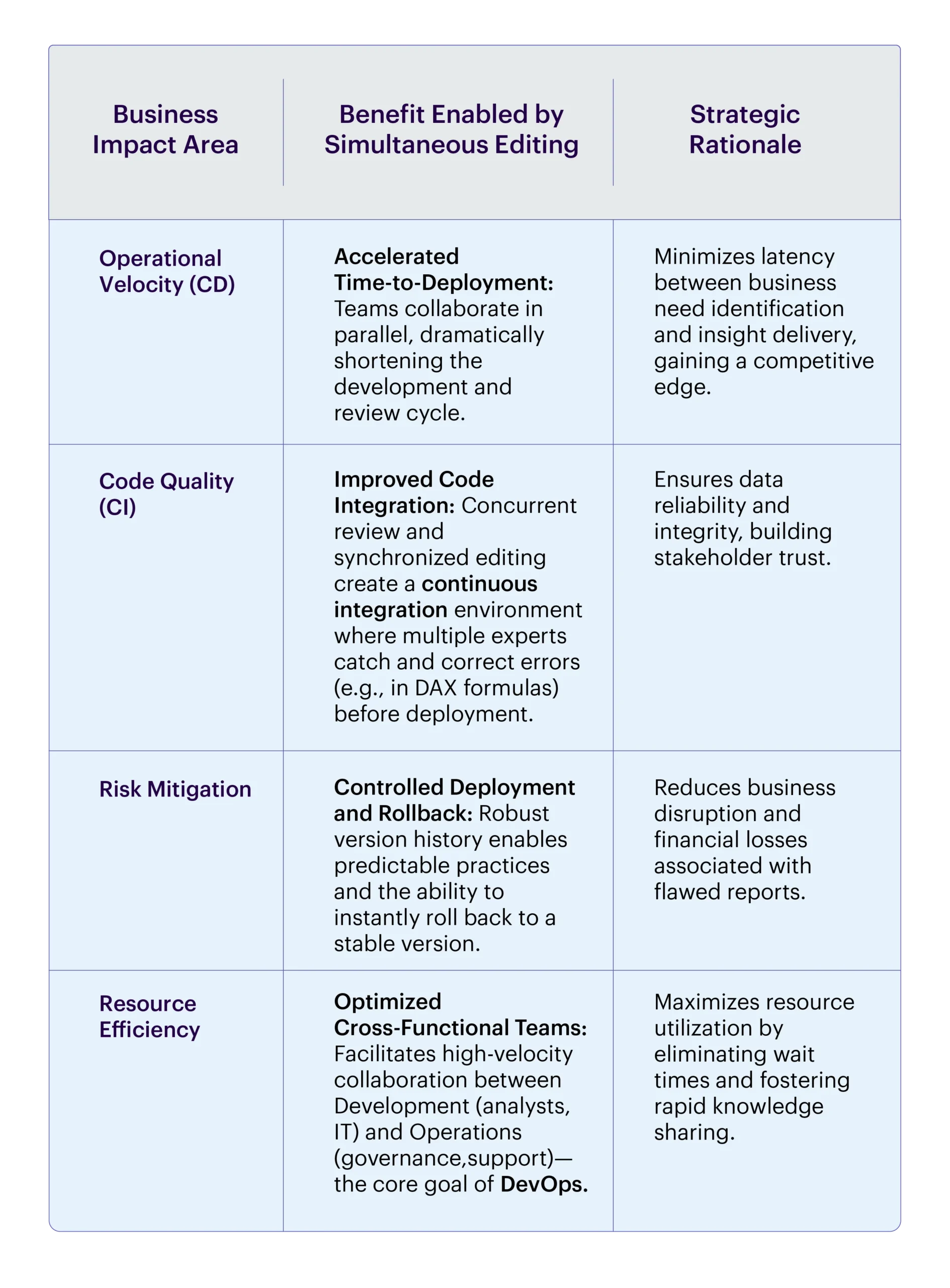
This parallel workflow is the key to enabling an automated CI/CD pipeline, tracking changes, and promoting artifacts from Development → Test → Production with greater speed and fewer human errors.
Prerequisites for Power BI Project Development
Establishing a robust development environment is crucial for effective collaboration and version control.
Software and Environment Setup
- Power BI Desktop (Latest Version): Must support the Power BI Project (.pbip) format. This format breaks the report into separate files, allowing source control systems to track granular changes instead of treating the entire project as a single, opaque file.
- Consistent Versions: Ensure consistent Power BI Desktop versions across all developers to prevent compatibility and integration issues.
Source Control Integration and Structure
- Git Repository Integration: A centralized Git platform (e.g., Azure DevOps Repos, GitHub) is required to store project files and manage version history.
- Convert to .pbip: Reports must be converted from .pbix to the .pbip folder structure for granular version control. This allows Git to track changes to individual components (like a new measure or a layout change), making diffs and merges cleaner.
Development Workflow and Access
- Defined Git Flow: A structured branching strategy (e.g., main for production, develop for integration, feature branches for individual work) is essential to isolate work and ensure branch stability.
- Required Permissions: Developers need Contributor access to the Git repo and Member access to Power BI workspaces to commit code and publish artifacts to the Power BI Service.
How: Implementing Power BI DevOps and Git Integration
To fully realize the DevOps benefits, Power BI content must be treated like application code, requiring specific technical setup:
- Workspace Strategy: Establish dedicated workspaces (Development, Test/UAT, Production). This enforces separation, preventing development work from impacting end-user consumption.
- Model and Report Separation: Utilize the co-editing of underlying semantic models to allow technical teams to jointly define shared tables, relationships, and Row-Level Security (RLS) settings, ensuring the data model (the code) is consistent.
- Linking to External Version Control (Git): Link Power BI development to Git (Source Control). This enables changes made in the Power BI Service to be committed, branched, merged, and reviewed using familiar developer workflows, which is essential for advanced change tracking and CI/CD-style promotions.
- Automation via Deployment Pipelines: The combination of Git integration and concurrent editing provides the input for automated deployment. Pipelines can execute unit tests on model changes (data validation, DAX correctness) before automatically promoting the report/dataset from Development → Test→ Production upon approval.
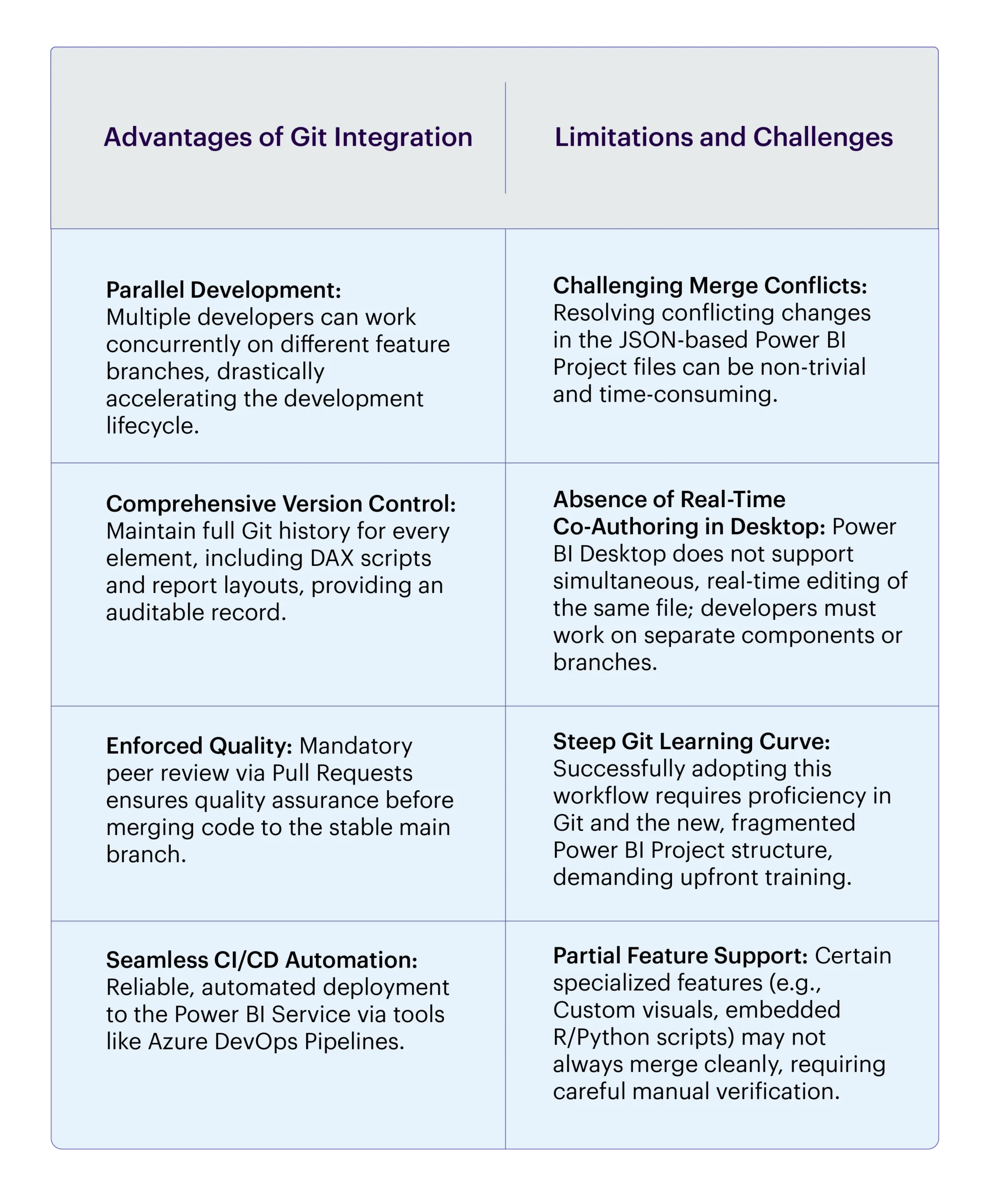
Advantages and Limitations
Conclusion: Power BI as a DevOps-Ready Platform
The evolution of Power BI into a genuine concurrent co-development platform is the indispensable foundation for a modern BI DevOps practice. By providing continuous integration, auditable version control, and seamless deployment pipeline enablement, Power BI drastically reduces deployment risk and elevates the speed of insight delivery. Organizations that adopt these features transform their analytics operations, achieving enterprise-grade agility, reliability, and governance.